






DataGangeR is a human-gated privacy protocol for Agent prototyping. You answer a short set of privacy questions, once, in a guided UI; DataGangeR turns your real dataset into a reviewable synthetic stand-in that a coding Agent can build on at full speed — and the Agent never sees the original records.
📖 Documentation: https://dataganger.biostats.ai/
Use only these official DataGangeR sources:
install.packages("dataganger")).Forks and copies are independently maintained. They are not reviewed,
released, or endorsed by DataGangeR; do not treat their privacy behavior
or release artifacts as those of the official package. Before using a
GitHub development build, confirm that the owner is
lennon-li and review the exact commit or release tag.
Let a coding Agent work at full speed on a synthetic stand-in for your dataset. You decide the privacy rules once; the Agent gets reviewed synthetic data — or a reproducible recipe to make it — and never reads the real data. And the package makes no network calls, so nothing ever leaves your machine.
spec +
roles + seed) it runs back through the package
to regenerate the approved synthetic data itself. The real records stay
out of the shared bundle.Let an Agent build on your data. Keep your data. Both.
flowchart LR
  R[(Your real data)] --> G{Human gates privacy<br/>once, in the UI}
  G -->|Path A| Bun[Synthetic bundle] --> AG1[Agent builds on reviewed data]
  G -->|Path B| Rec[Saved recipe<br/>spec + roles + seed] --> CLI[Agent runs the package] --> AG2[Agent regenerates approved data<br/>never reads the real data]
[!TIP] ### 🔒 Safe to try — your data never leaves your machine ✅ Processed locally, in memory only — never uploaded, never written to disk by the app, gone when you close it. ✅ No network calls or automatic external-browser actions — proven by a shipped self-test and a no-network CI job. The local Shiny app opens only when you call
run_app(). ✅ Open source — you (or your IT team) can verify your own copy.No account. No upload. No cloud. Point it at a sample dataset and see for yourself.
Analysts often need to share data structure with teammates, students, or coding Agents. Sharing the original data is not always possible. DataGangeR generates a synthetic “doppelganger” that preserves the structure, distributions, and relationships you need for development while reducing the need to expose original records.
Important: Synthetic data is intended to reduce direct disclosure risk, not to replace a formal privacy assessment. Review the comparison and privacy warnings before sharing any output externally.
# Released version from CRAN:
install.packages("dataganger")

# Development version from the canonical GitHub repository:
# install.packages("pak")
pak::pkg_install(c("lennon-li/dataganger", "synthpop"))
GitHub builds are development artifacts. Use them only when you deliberately need an unreleased change, have verified the repository owner and commit/tag, and are prepared to review the change before using it with sensitive data.
Strongly recommended: install synthpop
(above) for full-fidelity, relationship-aware synthesis. It is optional
— without it, DataGangeR automatically falls back to the dependency-free
internal engine (with a warning), so nothing breaks;
the synthetic data is just marginal rather than
relationship-preserving.
The guided Shiny app takes you from a real dataset to a shareable synthetic bundle in six steps — upload your data (or load a built-in sample), pick an objective, configure by answering two questions per column (does it point to a person? is it sensitive?) and reviewing what DataGangeR will do, generate the synthetic double, compare real vs. synthetic distributions, and export the bundle. The sidebar also includes a Report a problem button with a copyable issue report.
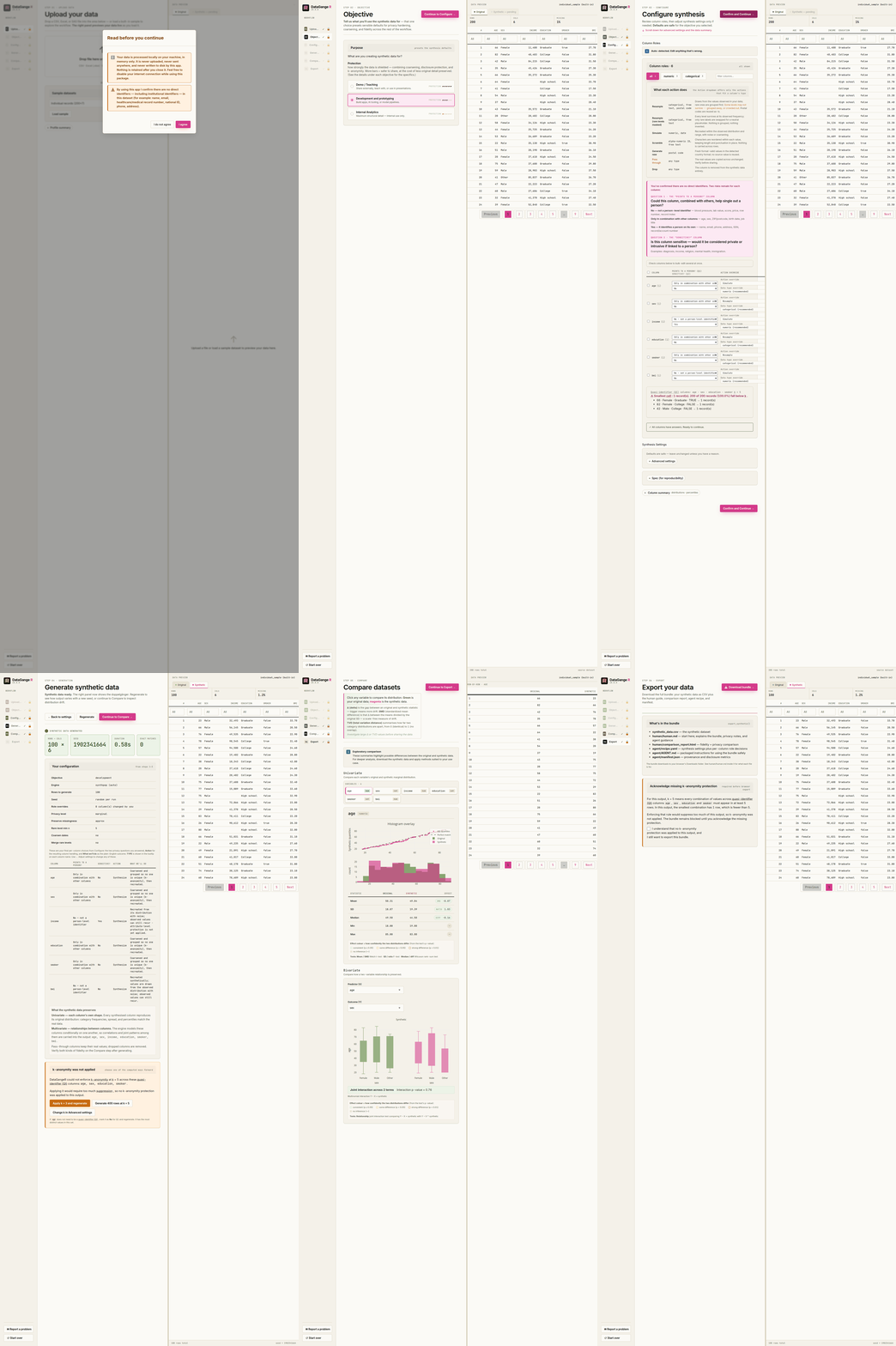
How privacy gating works. DataGangeR starts with a
no-direct-identifiers attestation, runs an early local fail-safe scan,
then hard-gates Configure until you answer two privacy questions for
every column. Those answers drive the synthesis rules and the exported
Agent workflow. When synthpop is not installed, the
attestation also recommends it for correlation-aware synthesis. See the
Privacy
gating and Agent workflows vignette.
The data preview adds an Exact matches tab whenever a synthetic row reproduces a real record, with amber highlighting for matches and red highlighting when a populated sensitive value is exposed. The Export step opens with a plain-language disclosure-risk brief and blocks sensitive exact matches until the user regenerates or explicitly acknowledges the remaining risk after a retry.
The Compare step separates Univariate distribution checks from Bivariate relationship checks. Bivariate tests fit an original-versus- synthetic interaction: low p-values mean the predictor-to-outcome relationship was modified (poorer fidelity), using the same fidelity colors as other tests. Effect sizes are odds ratios for binary outcomes, slope ratios for counts, and differences in slope for continuous outcomes; multi-level categorical outcomes receive a joint interaction test.
library(dataganger)
run_app()| Classify columns | Compare real vs. synthetic |
|---|---|
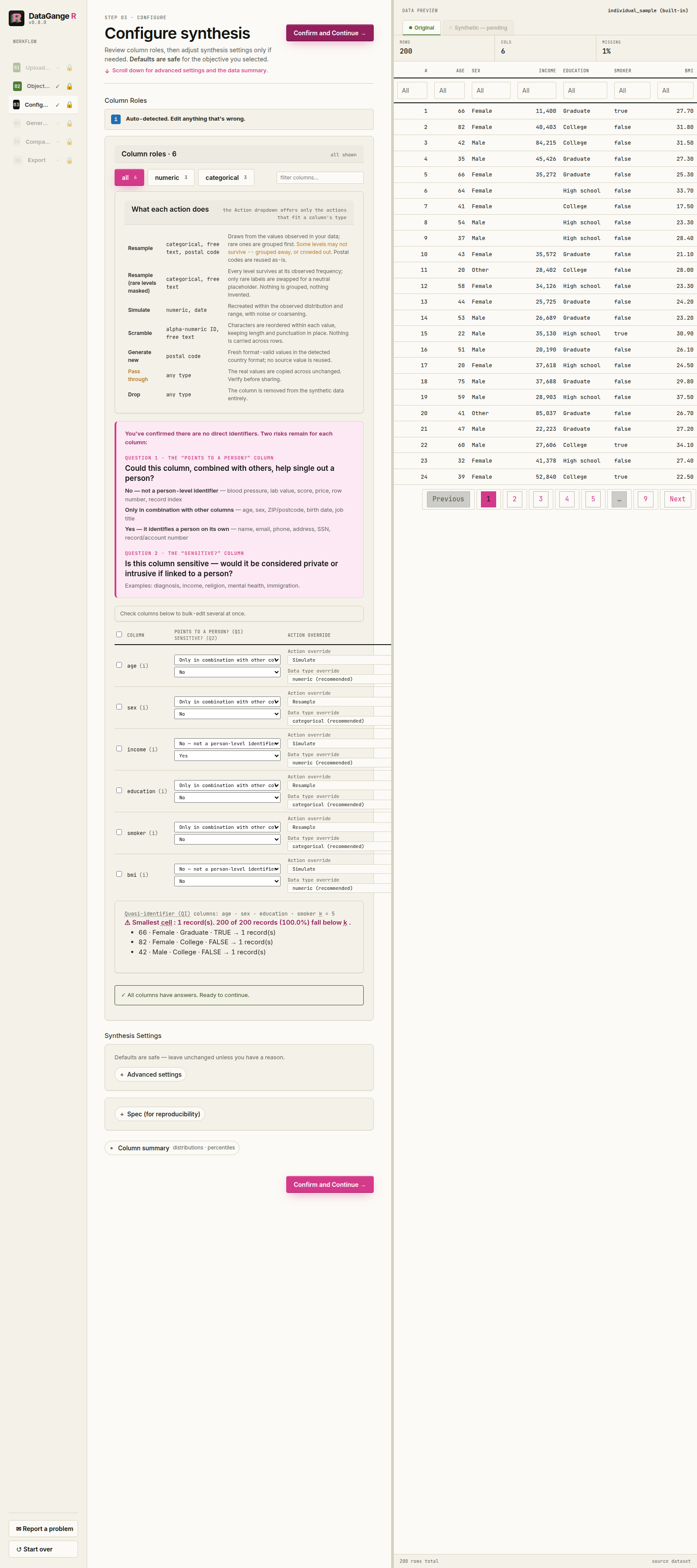 |
 |
Every step the app performs is a plain function call, so you can script the whole pipeline without the UI. Objective presets are:
development (the default) — balanced
protection for prototyping and app developmentdemo — strongest protection, best for teaching and
reviewed external sharinganalytics — highest fidelity, with more emphasis on
preserving relationshipsAn end-to-end reproducible pipeline looks like this:
library(dataganger)

dat     <- read_input("my-data.csv")          # or: individual_sample
profile <- profile_data(dat)
roles   <- detect_roles(dat, profile)
spec    <- synth_spec(purpose = "development", roles = roles, seed = 42)
syn     <- synthesize_data(dat, spec, roles)
export_synthetic(syn, original = dat, path = "dataganger_bundle.zip")

# Or do the whole thing in one call, straight from the raw file:
make_agent_bundle("my-data.csv", out = "dataganger_bundle.zip", seed = 42)

# Open a pre-filled issue for bugs, feedback, or feature requests
report_issue("The compare step was hard to interpret", context = "Shiny app")
The export is a single bundle: the synthetic CSV at the root, plus one folder for the human and one for the agent.
synthetic_data.csv            # the synthetic stand-in — the product
human/human.md                # what was done, plus the privacy notes
human/comparison_report.html  # fidelity, including relationship interactions
agent/recipe.yaml             # spec + roles + seed — regenerate approved data
agent/AGENT.md                # the agent workflow guide (never read the real data)
agent/manifest.jsonThe CLI follows the same spec-first pipeline an agent would use:
dataganger profile my-data.csv --out profile.json
dataganger roles my-data.csv --out roles.yaml
dataganger spec --purpose development --out spec.yaml

# Edit spec.yaml if needed: set seed, engine/name_strategy overrides,
# acknowledge_risk: true for analytics, and disclosure_roles: <column>: <direct|quasi|sensitive|none>.
# disclosure_roles is the compatibility YAML form; the app uses identifies + sensitive as the primary model.
dataganger synthesize my-data.csv --spec spec.yaml --out dataganger_bundle.zip
dataganger inspect dataganger_bundle.zip
The bundle’s agent/recipe.yaml captures the spec, roles,
and seed. To reproduce or vary the synthetic data later, an agent runs
the package against that recipe — no notebook, and without ever opening
the real data:
unzip dataganger_bundle.zip -d dataganger_bundle
dataganger synthesize my-data.csv \
  --recipe dataganger_bundle/agent/recipe.yaml \
  --out check.zip
For the full command list, run
dataganger::dataganger_cli(c("--help")). Agents can print
or copy the packaged workflow guide with
dataganger skill [--out <file>].
DataGangeR uses two synthesis engines. By default the engine is
chosen automatically by your objective: demo uses the
dependency-free internal marginal engine by default,
development requests moderate relationship preservation and
therefore routes to synthpop when it is installed
(otherwise falling back to the internal engine with a warning), and
analytics is the high-fidelity path that requires explicit
risk acknowledgement. In the Shiny app and CLI spec you can also choose
the engine explicitly (auto, internal, or
synthpop). Installing synthpop is
strongly recommended
(install.packages("synthpop")) for relationship-preserving
synthesis; the internal engine is the dependency-free fail-safe used
automatically when synthpop is absent.
Please cite synthpop when you use that engine:
Nowok B, Raab GM, Dibben C (2016). “synthpop: Bespoke Creation of Synthetic Data in R.” Journal of Statistical Software, 74(11), 1-26. doi:10.18637/jss.v074.i11
development, demo,
analytics, etc.) applies appropriate defaults for
coarsening, name handling, and rare-level treatment.readr).xlsx / .xls (via
readxl).sas7bdat / .xpt (via
haven)MIT © Lennon Li
